Help · Beginner Onboarding
How to get your first real result in Inflect
New here? Follow these steps in order. You will go from first optimization to first measurable result.
Before you start
- Pick one important public URL (service page, product page, or core blog post).
- Sign in first. You will use four core tabs: Optimize, Tracking, Citations, and LLM Traffic.
- Citations are not instant. Most teams see movement over days, not minutes.
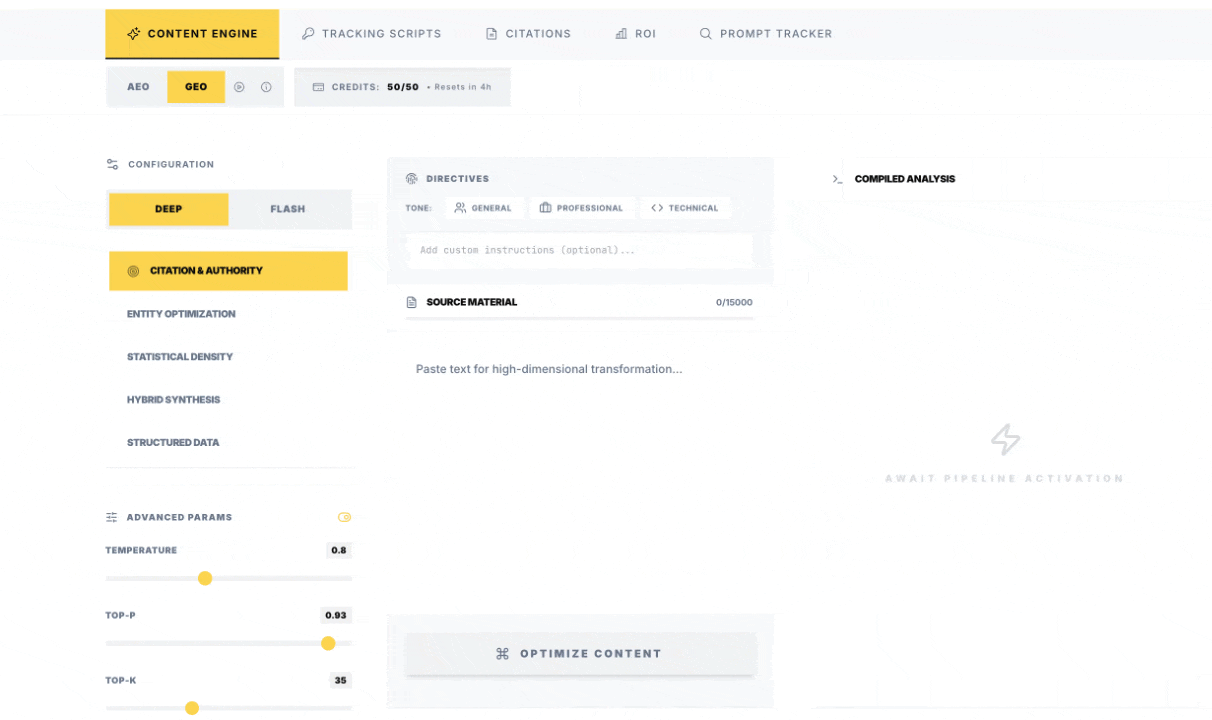
Run one optimization in the right mode
Open Optimize, paste your full page copy, choose a mode (AEO/GEO/Hybrid) and one strategy, then run.
Success check: output is complete and usable, not just a short rewrite.
Publish to a crawlable live URL
Move optimized content into your CMS/site and publish. Keep clear headings and stable URL paths.
Success check: the updated content is live on the public URL.
Install tracking once and verify
Go to Tracking, copy your key script, install globally, deploy, then run Verify Installation.
Success check: verification confirms script/key detected on live domain.
Triage citations, then read the measurement layer
In Citations, verify real rows and reject noise. Then use LLM Traffic and the Citations dashboard to see which sources and pages are compounding.
Success check: you can name one page pattern worth repeating.
Quick mode picker
- AEO: short factual answers (hours, pricing, direct questions, voice assistant style prompts).
- GEO: deeper pages meant to be cited in AI summaries (guides, comparisons, expert explainers).
- Hybrid Synthesis: conversion pages or editorial where you need both readability and citation structure.
If you are unsure, start with one GEO run on your strongest explainer page, then compare performance against one Hybrid run on a landing page.